Vendor payout settlement is the Monday-morning problem every food court already has: the guest paid once at the house till, seven stalls cooked, and nobody agrees what each vendor is owed.
Sales reports tell you what sold. They do not tell you what to transfer to the biryani stall after commission, GST, service charge, and last week’s leftover. Without a settlement, accounts live in a spreadsheet that the court manager and the vendor both distrust.
QuickKOT’s answer is Vendor Settlement next to Reports: the same paid tickets, rules per kitchen, a clean amount due, then a payout you record after you actually pay.
Why vendor payout settlement matters
In a food court, canteen, or hotel with centralised billing, the house collects the money. The vendors cook. That split is the product: one GST bill for the guest, many kitchens on the ticket.
The accounts problem starts after close:
- The house took UPI for a mixed cart — biryani + pizza + a cold drink.
- Each stall wants “their” sales.
- The court keeps a commission.
- GST may belong to the stall (they have a GSTIN) or stay with the house.
- Service charge usually stays with the court, not the stall.
- A refund on Thursday should not be argued on Saturday.
- Last period’s unpaid leftover is still sitting there.
If that lives in WhatsApp and Excel, the books are never clean. Vendors escalate. The house overpays “to keep peace” or underpays and loses a stall. Finance cannot close the month.
Vendor payout settlement is the ledger that says: for this week (or fortnight, or month), this kitchen is due this amount — and here is the payment we already made.
The problem, by floor
Food courts
A mall court with seven stalls is not seven restaurants. The guest expects one token and one bill. The court still has to pay each vendor. Typical damage without settlement: stall-wise sales get copied into a sheet, commission is applied by hand, GST is guessed, and two stalls argue about a shared combo. How the tickets split is already on QuickKOT — see food court billing and Token Display. Paying the stall is the next job.
Canteens
A college or office canteen with a tandoor counter, a snack counter, and a beverage stall often bills at one till. The contractor still owes each counter. Month-end “we will settle later” is how cash leaks and how two counters stop trusting the same close-of-day number.
Hotels
Breakfast, the coffee shop, and the specialty restaurant can share a guest check. After close the F&B manager still needs each kitchen’s share — not a mash-up of the property total — so the coffee shop P&L does not swallow the bar. That is the same hotel POS with centralised billing model, then a payout to each kitchen.
This is not a chain of separate restaurants. Separate doors and separate bills are Multi-Outlet. Settlement is for one house, many vendors, one guest check.
How QuickKOT keeps the accounts clean
On a centralised kitchen with two or more stalls, the house manager opens Vendor Settlement. Cashiers and kitchen logins do not see it. One kitchen is not a vendor court — add the second stall first.
- Every kitchen is a vendor — the same stations you already run, not a second vendor list to maintain.
- Rules sit per stall — GST to that vendor or to the house, service charge to the house (the food court / hotel, not the stall), commission as a percent of item value. Round-off stays with the house.
- One period at a time — daily, weekly, every two weeks, fortnightly, or monthly. Weeks do not spill into the next calendar month, so June and July do not share a payout.
- The statement is that window only — what sold, what was refunded, what is still unpaid from last time.
- Pay, then record — email the statement, pay outside QuickKOT (bank, UPI, cash), then settle with amount, how you paid, and the date. Partial is allowed. Leftover becomes next period’s arrears. The first payout freezes that window so a late ticket cannot rewrite a settled week.
- The stall sees the same numbers — the payout note can go to that kitchen’s manager. Extra addresses for that vendor stay on file for the next settle.
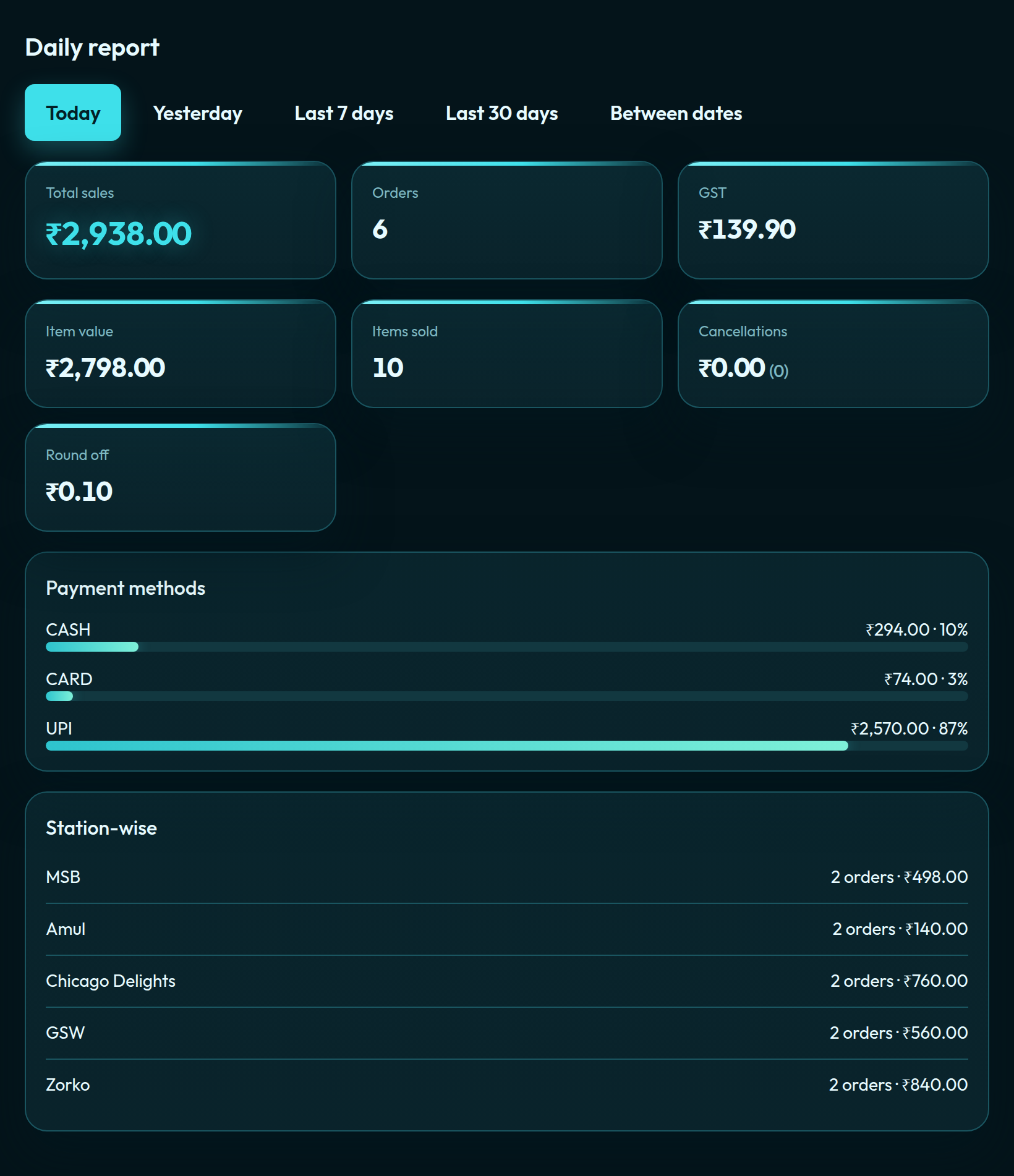
Daily reports, cashier-wise, and emailed summaries stay what they were. The guest still gets one GST invoice. Settlement does not invent a second POS — it closes the books on the tickets you already took.
What this is not
It is not a replacement for the daily report. Sales mix (UPI / card / cash) still lives there. Settlement answers a different question: what do we owe this vendor, and did we pay it?
It is not Multi-Outlet. A franchisee who bills on their own till does not need the house to settle them. If each restaurant is its own P&L across cities, see POS for restaurant chains.
A single café on Basic does not need vendor payout. That floor is limited orders, one kitchen. Vendor Settlement starts when two or more kitchens share one guest bill — Premium or Enterprise centralised billing.
Questions from the floor
What is vendor payout settlement in a food court?
The guest pays once at the house till. Vendor payout settlement is the later job: what each stall is owed after commission, GST, service charge, and refunds — then a recorded payment to that vendor.
Why do food courts and hotels need vendor settlement if they already have sales reports?
A sales report shows what sold. It does not apply house commission, decide who keeps GST or service charge, carry last period’s unpaid leftover, or record that you actually paid the stall. Settlement is the payout ledger. Reports stay as they were.
How does QuickKOT settle vendors on centralised billing?
House managers on a centralised kitchen with two or more stalls open Vendor Settlement. Each kitchen is a vendor. Rules sit per stall. The statement is one period. After you pay outside QuickKOT, you record the payout. Partial is allowed; leftover becomes next period’s arrears.
Does vendor settlement change the guest bill or daily sales?
No. The guest still gets one GST invoice. Daily reports, cashier-wise, and summaries do not change. Settlement is its own ledger, read from paid tickets and refunds.
See also: food court POS, hotel POS, how the court tickets split, hotel centralised billing, and plans.
Sign up at app.quickkot.com/signup — Basic is free. Food courts, canteens, and hotels that need several kitchens start on Premium (15-day trial) or write to support@quickkot.com.


