Kitchen display
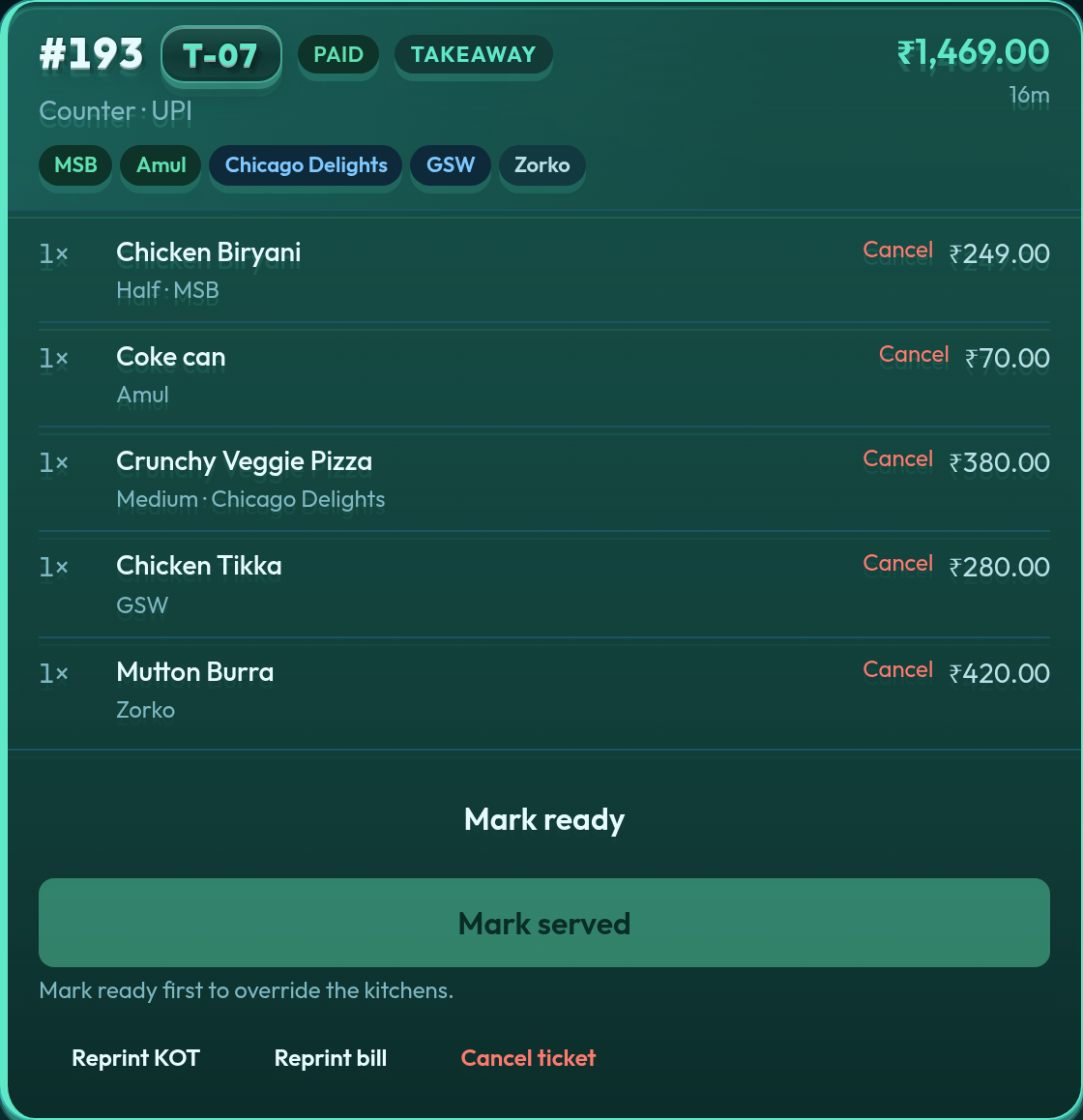
Station logins see only their items — “my portion ready”, then picked up. Managers see every ticket, reprint KOT/bill, void a line, or add to a postpaid order.
Free POS for restaurants in the cloud: kitchen tickets and GST bills in the browser, with no desktop install and no salesperson demo. Sign up and start on Basic (free) or a Premium trial.
Only POS where you pay for only what you need.
The plan runs the floor: orders, kitchen tickets, and the bill. Add Inventory Management, the Self ordering Kiosk, and a larger plan when the house needs them.
The same product. A 12-cover café on Basic, a food court on Premium. Four billing shapes.
Free POS for restaurants: single kitchen, KOT, GST / FSSAI bills. Start free on Basic.
One counter, many stalls, one GST bill, token pickup. The POS Indian malls still stitch together by hand.
Coffee shop, specialty restaurant, and bar on one guest check. Each kitchen only sees its lines.
Franchise and multi-city restaurants. Distinct tills. Hub & Spoke supplies the outlets from the central kitchen.
The same flows your team will use at 1pm on a Saturday — collect payment, merge or split a table, mark a station ready, export last night’s sales.
Station logins see only their items — “my portion ready”, then picked up. Managers see every ticket, reprint KOT/bill, void a line, or add to a postpaid order.
Cash tender with change, card, UPI, or a split across all three. Daily report bars follow the mode you actually chose.
Postpaid or prepaid. Table list on every plan.
Station → category → item. Variants, sub-variants, add-ons, stock alerts. Bulk Excel upload on Economy and above.
FSSAI, GSTIN, and optional distinct station totals on one invoice when kitchens bill separately. Send that bill on WhatsApp from Economy and above.
On Premium and Enterprise: guest menu on app.quickkot.com, stock-aware, pay by QR or “pay at counter” drafts that load on the POS. Same feature on both plans — Enterprise only starts with higher kitchen and user caps. Email support@quickkot.com if an Economy restaurant needs QR.
Two bills at one table, friends joining, or a party moving to a free four-top — on the kitchen ticket, not a notepad. Split, transfer, and merge are on Economy and above when table management is on. On Multi-Outlet, merge stays in the same outlet. How merge and split works.
Public pickup board after payment. A kitchen lights next to the token when that stall marks ready — guests watch one screen instead of shouting. Premium and Enterprise, centralised floors. More on food court POS.
See which counter login rang the sales — orders, UPI / card / cash, discounts, cancels — on the same date range as the daily report. Shows when the floor has more than one live counter login.
Floor-stand menu: guests browse photos, pick variants, and pay UPI or card as the payment gateway is set. Cash stays at the billing counter. Add-on for any plan except Basic. See the Self ordering Kiosk.
Suppliers, purchase bills, what is on hand, the recipe behind each dish, a real time gross profit graph, and a supplier price comparison. An add-on when the store room should live in the same system. See Inventory Management.
Your central kitchen supplies every outlet with the right GST document: a delivery challan or a tax invoice, batch and expiry on every line, a ledger for each outlet, and GSTR-1, e-way bill and e-invoice files ready for your accountant. See Hub & Spoke.
The phone book for tables. A manager or cashier saves the party, holds a table for the turn, and seats them when they arrive. Economy and above, while the floor uses tables. How reservations work.
A recipe records how much of each material a dish, an add-on, or a takeaway pack uses. A completed order keeps that cost. Part of Inventory Management. How to create a recipe.
A third order type beside dine in and takeaway. The customer by mobile number, saved addresses and zones, delivery and packing charges with their own GST, WhatsApp updates with the rider's name and number, and cash on delivery that settles at the door. Economy and above. How delivery orders work.
Delivery orders on your own menu link or web address: verified on WhatsApp, accepted on Draft tickets, cash on delivery or pay online through your own payment gateway. No commission per order. See Direct Orders.
Each online category tile follows Monday–Sunday hours. The QR menu lists closed tiles below with the next open time; the kiosk shows only what is on now. Direct Orders uses that same QR clock — breakfast comes off without a manual switch. The till still sells what staff ring. See menu schedule.
One menu, a price for every area: AC hall, non-AC, rooftop or garden. Prices follow your menu price by a rule, any dish can be set by hand, and some dishes can stay off in a section. POS, the table QR, the bill, the KOT, service charge and reports follow the table's section. Economy and above. See section-wise menu.
Cakes, catering and party orders booked for a later date. Take the advance, print or WhatsApp the receipt, and the order reaches the kitchen on time with the cake details on the KOT. On the day, the guest pays only the balance. Cancel with a refund, a charge with its own tax invoice, or customer credit. Economy and above. See advance orders.
Send your menu to both apps, open or close the listing, and take their orders on the kitchen display: Swiggy tickets orange, Zomato tickets red, with accept, reject and food ready on the card. Upload the payout file and each order is reconciled with its commission, tax withheld and net payout. Add-on ₹499/mo for both apps, Economy and above. See how it works.
MSB only gets biryani. Chicago Delights only gets pizza. The floor can still sell both on one order — tickets split by station.
Completed bills stay searchable for 48 hours if you need to change payment mode or cancel. Paid plans export a station-wise sales workbook.
Testimonial

“What was managing Shimla QoH Food Court like before QuickKOT? Guests paid at different desks and the queues slowed eleven stalls. Biryani from one kitchen and pizza from another now come together as one bill. The rush is still there, but now it is much more organized.”
Shimla QoH Food Court
shimlafoodcourt.com
One bill across eleven stalls.

“Our counter used to get crowded in the evenings. With the QuickKOT kiosk, guests pick their flavours and pay on their own, so the queue moves faster and my staff can focus on serving.”
Mr Kamal Thakur
Manager, Amul Ice Cream Parlour
The kiosk shortened our queue.

“Orders come in from the kiosk or the counter, reach the kitchen on the KDS straight away, and guests wait for their token number on the display. QuickKOT runs our whole flow, from order to pickup, without confusion.”
Mr Kapil
Owner, Murg Shahi Baithak
From order to token, one smooth flow.

“The kitchen display, billing, kiosk and inventory all work together. Staff see orders on screen, guests can order themselves, and I can see my stock without counting by hand.”
Mr Arun
Owner, Chicago Delights, Shimla
KDS, POS, kiosk and stock, all in one place.

“The KDS keeps the kitchen on track, the POS makes billing quick, and inventory shows us what is running low before we run out. It is simple enough for the whole team to use.”
Mr Manu
Owner, Zorko, Shimla
Kitchen, billing and stock under control.
Google or email signup on app.quickkot.com. A 12-cover café starts on Basic. Upgrade when the floor needs KDS, reports, or a second kitchen.
Create your POS